|
Current Version: 5.1 (minor fix for bug from 5.0) |
Price: $15 |
|
You will automatically receive an email with the download link once you order as well as being brought to a download page . .
If you aren't redirected to the download after purchase, please check your email before contacting me! Some browser script blockers are preventing the redirect but the email will go automatically for each order. |
|
Check out the FREE Beta actions I have available for download/testing!
See a video of step-by-step processing of a narrowband image using these Actions!
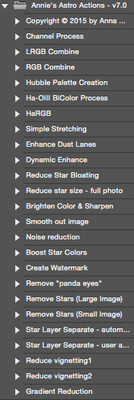
Actions included in Annie's Astro Actions v5.0 (& 5.1): Some examples of the Actions in use (more examples will be posted soon)
![]() |
![]() |
![]() |
![]() |
![]() |
![]() |


| Channel Process: | Used to do most of the initial processing for each channel file you have (or a combined RGB image) |
| LRGB Combine: | Takes 4 aligned channel files to create a complete LRGB image. (using Lab color for better results) |
| RGB Combine: | Takes 3 aligned channel files to create a complete RGB image (can be used for Ha, SII, and OIII as well) |
| Enhance Galaxy Dust Lanes: | Used to bring out and sharpen the dust lanes of a galaxy |
| Dynamic Enhance: | Used to quickly dynamically stretch and increase contrast in your image |
| Make DSO Stand Out: | Highlights and Sharpens your DSO |
| Reduce Star Bloating: | Reduces star bloating that can occur when stretching your image |
| Reduce Star Size - full photo: | Reduces the size of your stars for your entire image rather than just selected large stars |
| Brighten Color & Sharpen: | Increases the saturation of colors in the image while also sharpening the image slightly |
| Smooth Out Image: | Gives the overall appearance a "softer" look |
| Noise Reduction: | Reduces the noise in your overall image |
| Remove Stars (Large Image): | Removes the Stars from your image (for large chip cameras & DSLRs) |
| Remove Stars (Small Image): | Removes the Stars from your image (for small chip cameras) |
| Create Mosaic (6 panel): | Takes 6 panels and does the initial processing (feathered border, rough alignment based on user-input) for a mosaic. |
| Create Mosaic (4 panel): | Takes 4 panels and does the initial processing (feathered border, rough alignment based on user-input) for a mosaic. |
| Star Layer Separate (automatic): | Separates the Stars from your DSO and places them in separate layers, no user prompts to assist. Effective in most cases. |
| Star Layer Separate (user assist): | Separates the Stars from your DSO and places them in separate layers, has prompts for user assist to make more accurate |
| Create Watermark: | Creates a watermark across your image to protect your images against copyright infringement |
| Reduce Vignetting Method #1: | 1 of 2 methods hat will help reduce vignetting in your image ... try both to determine which will work best for your image |
| Reduce Vignetting Method #2: | Second method for reducing vignetting. This one requires less user interaction |
| Gradient Removal: | Reduces color gradients in your image |
| Simple Stretching: | Walks you through simple curves and levels stretching |
| Remove "Panda Eyes": | Removes dark rings that can appear around stars when over-sharpened |
| 0-90º Star Spike Brush: | Creates a star spike brush angled 0-90 degrees |
| 45-135º Star Spike Brush: | Creates a star spike brush angled 45-135 degrees |
| Custom º Star Spike Brush: | Creates a star spike brush to a custom angle you set (arms of spikes will be 90º from each other at the angle you specify) |
Will you process my astrophotos or do a video of my image being processed for me?
In short: Yes, I will.
I am happy to do a tutorial video with your data. At this point, I do not have a set rate for personal video tutorials but rather do these to help out fellow astrophotographers. If you wish to make a donation to help compensate me for the time involved in this, that is always appreciated.
I am also happy to process your astrophotos for you if you provide me with the raw subs and calibration frames or the raw stacks (already calibrated). I do charge a modest fee for this as processing astrophotos can be a very time intensive process. Contact me with your inquiry for more information.
Can I use your actions on all of my computers or just one?
Yes, as long as they are all your computers you may load the actions on multiple computers (example: main processing computer and travel laptop)
What is the Compatibility?
Astro Actions are compatible with all Full versions of Photoshop (including CS5)
[in English only - foreign language versions may not work] and both Windows and Mac
These actions work on 8 and 16 bit RGB images in Photoshop CS2 through CS5 (if you want to work on a 32 bit image, convert it to 16 bit first); and in 8 bit in earlier versions of PS.
The actions have been thoroughly tested on CS2, CS3, CS4, and CS5. None of the testers reported ANY problems on CS2 or above.
If you have a problem it is most likely a setting or default that has been changed in PS. Contact me with any error messages and, if possible, screenshots with relevant information (which action, error details, photo details such as RGB, greyscale, bit type, etc) and I will get back to you as soon as possible to work out the problem and come up with a solution.
The actions have been tested with PS7 & CS, however, the layers have to be manually merged throughout the steps in order to get most of the actions to work.
If you have a version earlier than CS2, keep this in mind before purchasing. You will most likely have to rework a couple of the actions yourself to manually.
What about PS Elements?
There is not currently a version of Annie's Astro Actions for Photoshop Elements. As I do not own a copy of Elements this is unlikely to change in the future. If, however, I do eventually create a version for Elements I will post that news on my main Actions page.
How do I load Annie's Astro Actions?
Full instructions on how to load the actions is included with the download file in the "Release Notes & Instructions" file
What actions are planned for future versions?
Actions for future versions are created as users request them and as I see a need for them in my own processing. I am open to suggestions, so feel free to shoot them to me via the Contact page.
I have receieved a few requests for an automatic star-spike tool. However, I am not trying to reproduce others' action sets that are available but fill the void in what theirs cannot do. I have this request in the back of my mind and I might come up with one in the future, but for now it is not in the immediate works. There is a star-spike brush action in the set which allows you to "paint" on the spikes through the created brush, I believe this allows you more control and customizing with your spikes.
What about updates? I see you just released a new version but I bought the actions just before they were released.
All updates to new versions, including any new actions in the newer version are included with your purchase. I send out an email to everyone who has purchased the action set when a new release is out with instructions on how to download the update.
What if I have to reboot my OS and I lose the actions, do I need to buy them again?
Of course not, use your original email and click the download link. It will send me a request for reactivation for the download which I will process as soon as possible.
What if I can't find the email anymore?
Just shoot me a message via the Contact page. I have a record of all previous sales so I can send you the reactivation link from that.